When will the non-examined assessment (NEA) brief be available?
The live NEA briefs will be released on 1 October each session. You can only access the NEA if you have a valid booking for your learners.
How do I access the non-examined assessment (NEA)?
You will need to follow these steps to get the materials. You will need to have registered and booked your learners on the current assessment window:
- Log in to the Portal.
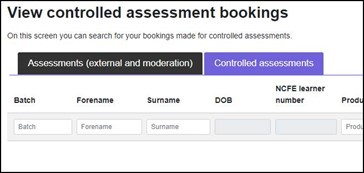
- Go to 'Bookings' tab and click 'View Assessments'.
- Search for batch number or product code.
- Select all relevant learners.
- Click 'View Bookings'.
- Click the component they want for a dropdown menu.
- Download via the material link.
This process can be found in the Portal User Guide.
Where can I find the regulations for the NEA?
The NEA regulations are in the subject-specific tutor guidance documents. You can download the tutor guidance documents under the ‘support materials’ tab, in the teaching/delivery guidance section on the qualification pages. Please ensure you’re using the latest version downloaded from the website.
For additional information about V Cert delivery or regulatory questions, please refer to the JCQ guidance document.
Are example responses for the NEA available?
Yes. Please visit the qualification page on our website and you can download them from the ‘assessment materials’ section.
Is additional time allowed for the NEA?
Yes. Additional time is allowed for the NEA where appropriate. The allocated time for each NEA is outlined in the tutor guidance for the qualification. If a learner is entitled to extra time as a reasonable adjustment for external assessments, this can also be applied to the NEA without needing prior approval.
However, any reasonable adjustments must reflect a learner’s normal way of working. All reasonable adjustments must be recorded on our Reasonable adjustment tracking document and centres must keep this evidence available for inspection. Details of the adjustments applied should also be included on the checklist with the learner’s evidence and submitted via the Portal.
Can learners have additional resources to help them complete the preparation and research task, such as textbooks or notes?
Learners have two hours of preparation and research time to support them in completing the NEA. This 2-hour time period is entirely open book, so learners can review their teaching and learning materials, textbooks, the internet and other published materials. During this time, they should develop a research support pack which they can use when completing the NEA. You can find more detailed information about the research pack in the Tutor Guidance document on each qualification page of the website or within your assessment materials pack, downloaded from the Portal.
Each individual learner should produce their own research and support pack. Supervisors must not direct pupils or provide templates or writing frames for them to complete during the NEA.
Can learners use the internet for task completion?
Learners only use the internet for the completion of NEA tasks where the brief states it is allowed.
What formats are acceptable for the internet browsing history for the NEA?
Each learner must list their browsing history for each task which allows internet access. The supervisor is responsible for making sure all learners begin each task and session with a cleared browsing history. At the end of the supervised session, the supervisor should get a record of each learner’s internet browsing history by selecting the relevant history tab in the browser toolbar. A learner’s browsing history should be clearly attributable to the individual learner who completed it. Acceptable formats include a screenshot of the learner’s history, an IT-based report or a typed/written list of websites accessed during the session such as in the example below:
Record of internet browsing history
Learner Name: XXXX XXXX
Learner number: 106xxx
Qualification: NCFE Level 1/2 Technical Award in Food and Cookery (603/7014/2)
Assessment series: Summer 2025
Are learners allowed to use templates/writing frames to complete NEA tasks?
Learners should only be provided with the learner version of the NEA brief; centre staff should not provide any additional resources or support, such as a template/writing frame or set of questions that could be seen to assist learners.
What should we do if the specification doesn’t include or state something which is required for the NEA tasks?
The specification is not a list of everything which could be included in the NEA tasks – it is an overview of the vital components and content which should be included in teaching the qualification. In industry, there will be differences in the processes and/or equipment that are used, so tutors will need to apply the specification to context and include specific detail regarding what could be used in the industry.
What should we do if a learner is absent for a planned task?
If a learner is absent from one or more supervised sessions, they should be given the opportunity to make up any missed time. The length of the assessment window allows centres to implement their contingency plan in these cases. If a learner is unable to carry out the NEA tasks, centres should follow the special considerations or the access arrangements and reasonable adjustments guidance on our website.
Which software or equipment are learners allowed to use to complete the NEA tasks?
Where no specific recommendations are provided, learners should select the software or equipment which is capable of allowing them to access all elements of the specification and undertake the assessment effectively. Tutors should refer to the guidance and NEA brief for further information.
Should learners’ research be submitted to NCFE?
Yes, centres must retain learners’ research support packs and upload them with learner evidence to NCFE if selected for moderation. Required evidence for upload can be found on the Evidence Checklist which is in your assessment materials, downloaded from the bookings area of the Portal.
Are tutors allowed to demonstrate tasks from the NEA and/or share indicative content with pupils before they complete the NEA tasks?
No, tutors should not use live NEA content or tasks as examples – the skills should be covered in the delivery of all content areas contained in the subject specifications. Under no circumstances should indicative content or live mark schemes be shared with learners; this would be seen as malpractice.
What resources can be used during the research task?
Learners should have access to relevant resources during their research activity – it is up to them to identify what would be relevant.
What format should learner evidence be in?
This decision is up to the centre. If a learner’s evidence is contained in a single document, it should be clearly indicated which work belongs to each task to support both assessment and moderation. If a learner’s evidence is on separate documents, each document will need to be labelled correctly. All evidence will need to be uploaded to NCFE for learners selected for moderation, including the assessor feedback document and student research pack. We accept both .doc and .pdf file types, and further information can be found in the Portal User Guide.
Can teachers adapt or change when the learners can carry out research?
No. They should follow the tutor guidance and NEA brief as this would be seen as malpractice. The tutor guidance document is contained within the NEA pack that is downloaded from the Portal and can also be found on individual qualification pages. You’ll need a Portal login to access the document from either location. The learners can only carry out research when the project brief allows it. Their research notes, taken from appropriate sources (including lesson notes and textbooks), should provide all the information they require to complete the tasks.
If my learner hasn’t completed all the NEA tasks, when submitting marks should they be left blank or marked as ‘did not attend’?
If learners have attempted the NEA but have achieved no marks, the marks should be entered as 0. If they have not attempted the task, this should be marked as DNA. If no tasks for NEA have been attempted, each task should be entered as DNA and the learner’s overall mark would be DNA.
What training and support is available to assessors to support with marking the NEAs?
We deliver assessor training sessions throughout the year. Find out more.
We will release standardisation packs for each subject early in October and you will be able to find them in the ‘Support’ area of the individual qualification pages on the NCFE website.
Does the resource pack have to be typed/handwritten notes, or can screenshots and images be included?
The pack may contain images and screenshots if that is the pupil’s preference. Typed and handwritten notes are also acceptable.
What exemplar materials are available?
Exemplar materials are available on our website – each qualification page has a set of exemplars available in the assessment materials section.